Solo Developer 2026 Completed
Muse
A macOS menu bar app that makes the Magic Mouse surface work like a small trackpad: one finger moves the cursor, two fingers scroll, and a quick tap can click. Built test-first, with 79 unit tests and 100% line coverage of its core logic.
Overview
Muse reads raw touches from the Magic Mouse through Apple's private MultitouchSupport framework and reshapes what macOS does with them. One finger sliding on the surface moves the cursor, like a trackpad, and the scroll events macOS would normally send for it are dropped. Two or more fingers scroll as usual, including momentum. An optional tap to click turns a short, still one-finger tap into a left click, and a setting can stop the optical sensor from moving the cursor at all. Trackpads and ordinary scroll-wheel mice are left alone. It runs from the menu bar, starts at login, and makes no network requests.
Problem
The Magic Mouse has a touch surface, but macOS only uses it to scroll, so a one-finger brush while clicking or resting your hand scrolls the page. I wanted the surface to behave like a tiny trackpad instead: small cursor moves without moving the mouse, scrolling only on purpose with two fingers, and taps that click.
Constraints
- macOS has no public API for raw Magic Mouse touches, so Muse depends on the private MultitouchSupport framework, which a future macOS update could break
- macOS does not say which device a scroll or pointer event came from, so the source has to be inferred from timing and finger state
- Events are filtered in a CGEventTap, which needs the Accessibility permission; every rebuild gets a new ad-hoc signature, so the permission has to be granted again
- Trackpads and other mice must behave exactly as before
- Native macOS 13 or later, with no third-party dependencies and no network access
Approach
The code is a Swift package split in two. MuseCore holds every decision as plain, testable Swift: parsing touch frames, tracking fingers per touch session, deciding whether a scroll may pass, detecting taps, turning finger movement into cursor movement, keeping the cursor on screen, recognising Magic Mouse devices, and loading settings. The app target is thin glue: a multitouch callback that feeds MuseCore, a CGEventTap at the head of the HID event stream that drops or lets through scroll and pointer events, the menu bar, and a SwiftUI Settings window. Each behaviour was built red-green-refactor, with the failing test committed before the code that passes it.
Key Decisions
-
Decision 01
Keep all logic in a tested core library and the system glue thin
ReasoningPrivate framework callbacks and event taps are hard to test, but the rules they apply are not. Moving those rules into MuseCore let every one of them be unit tested, and `make coverage` is kept at 100% for that library.
Alternatives considered- One app target with the logic inside the callbacks (only testable by hand)
-
Decision 02
Infer the event source from touch timing
ReasoningA scroll event does not name its device. Muse treats a continuous scroll as coming from the Magic Mouse only when the mouse was touched more recently than any trackpad and a finger is down (or was within the last second), so trackpad and scroll-wheel scrolling always pass.
Alternatives considered- Filtering every continuous scroll (would break the trackpad)
-
Decision 03
Gate scrolling on the gesture, not the frame
ReasoningFingers do not land or lift at exactly the same time. Scrolling is allowed for 0.25 seconds after two fingers were last down, and momentum after lift-off passes only if the gesture that started it used two fingers, so two-finger scrolls never stutter and one-finger flicks never coast.
Alternatives considered- Checking the finger count on each event (drops scrolls mid-gesture)
-
Decision 04
Tag Muse's own events
ReasoningCursor moves and clicks that Muse posts carry a marker value, so the event tap can tell them from hardware. That is what lets the optical-sensor setting block real mouse movement while still letting Muse's own moves through, and stops a real button press from being mistaken for a tap.
Alternatives considered- Pausing the tap while posting events (racy)
-
Decision 05
Post drags when a button is held
ReasoningA plain mouse-moved event while a button is down breaks text selection and window dragging, so cursor moves are posted as left or right drags when that button is held.
Tech Stack
- Swift
- AppKit
- SwiftUI
- Core Graphics event taps
- MultitouchSupport (private framework)
- Swift Testing
- Swift Package Manager
- Make
Result & Impact
- Unit Tests 79 in 12 suites
- Core Logic Coverage 100% of lines in MuseCore
- Network Requests None
- Platform macOS 13 or later
Muse is a working, open source menu bar app. It installs with `make install`, starts at login, and is tuned from a Settings window whose changes apply while you drag. Because it relies on a private framework, it can break with a macOS update, and it is built and signed locally rather than distributed as a notarised download.
Learnings
- When the operating system will not tell you where an event came from, timestamps and state machines can answer it, but only if the rules are small enough to test one by one
- Keeping the untestable part thin made test-first development practical even for an app built on a private framework and event taps
- Small timing tolerances, like a quarter second of grace for a finger that lifts early, decide whether input feels natural
- Posting synthetic input means thinking about every app that consumes it, which is why a held button turns a move into a drag
Muse is a small, open source macOS utility. It depends on Apple’s private MultitouchSupport framework, so a future macOS update could break it, and it is built and installed from source rather than shipped as a signed download.
Screenshots
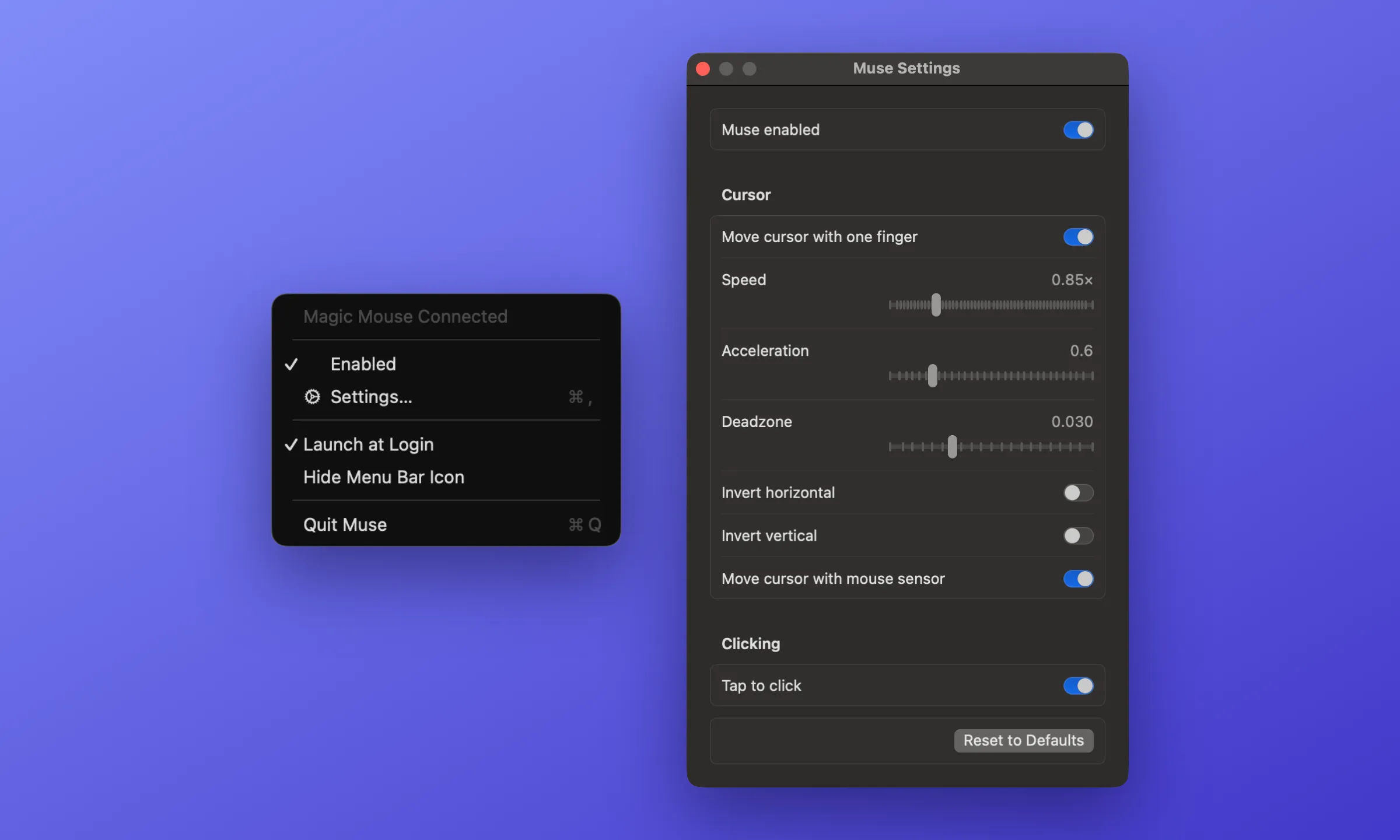 Left: the menu bar menu, with connection status, pause and resume, Launch at Login, and the option to hide the icon. Right: the Settings window, which applies changes while you drag so the mouse can be tuned as you try it.
What’s Built
- Cursor: One finger on the surface moves the cursor, with speed, acceleration, a dead zone against jitter, and per-axis inversion
- Scrolling: Two-finger scrolling and momentum pass through; one-finger scrolling is blocked
- Tap to click: An optional quick one-finger tap is a left click, and two quick taps a double click
- Optical sensor toggle: Sliding the mouse on the desk can be turned off, so only the touch surface and the trackpad move the cursor
- Menu bar: Connection and permission status, pause and resume, Launch at Login, and a hideable icon
- Settings window: Every option in a SwiftUI window that stays on top and applies changes as you drag
- Tooling:
make install,make test,make coverage,make probeto list touch devices, and a--debugmode that logs finger counts and blocked scrolls
How It Works
Muse hooks every multitouch device and records which ones are Magic Mice by their device family. Frames from the mouse update a touch session (current fingers, the most fingers in this gesture, when two fingers were last down) and drive the cursor and the tap detector. A CGEventTap sees every scroll and pointer event before applications do and asks the touch session whether it may pass.
What’s Next
- Distribution: A signed, notarised build so the Accessibility permission survives updates
- Compatibility: Re-checking the private framework on each new macOS release