In one line: WHERE filters rows before they are grouped; HAVING filters groups after their aggregates are calculated.
Use HAVING when you need to filter a group of rows based on an aggregate value, such as a count, total, or average. WHERE and HAVING often appear in the same query, but they work at different stages:
WHEREfilters individual rows before they are grouped.GROUP BYforms groups from the remaining rows.HAVINGfilters those groups after an aggregate has been calculated.
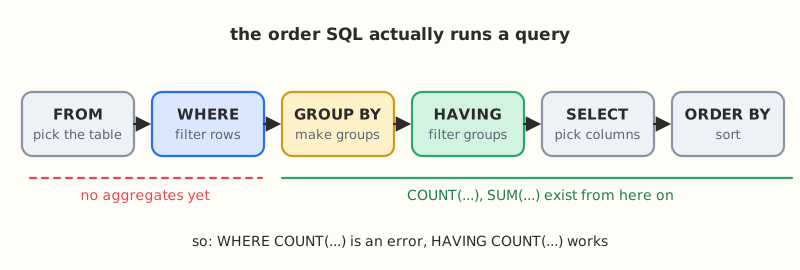 The order SQL evaluates a query, which is why aggregate conditions belong in
 HAVING.
Example: candidates with every required skill
Suppose candidates has one row per candidate skill. To find candidates who know Python, Tableau, and PostgreSQL, first keep only those three skill rows. Then group them by candidate and retain groups containing all three distinct skills.
SELECT candidate_id
FROM candidates
WHERE skill IN ('Python', 'Tableau', 'PostgreSQL')
GROUP BY candidate_id
HAVING COUNT(DISTINCT skill) = 3
ORDER BY candidate_id;
How the query works
WHERE skill IN (...)removes skills that are not required for this role, such asRorSQL Server.GROUP BY candidate_idcollects each candidate’s remaining skill rows into one group.COUNT(DISTINCT skill)counts the different required skills in each candidate’s group.HAVING ... = 3keeps only candidates with all three required skills.ORDER BY candidate_idreturns the qualifying candidates in ascending ID order.
When to use this pattern
Use this pattern when a requirement means “has all of these values,” such as a customer who bought every product in a set or a student who completed every required course. Change the list in IN (...) and the number in HAVING together so that the count matches the number of required values.
Common mistakes
- Do not use
WHERE COUNT(...):WHEREruns before aggregate values exist. Put aggregate conditions inHAVING. - Use
COUNT(DISTINCT skill)when duplicate skill rows are possible;COUNT(skill)could make a candidate appear to have more required skills than they actually do. HAVING COUNT(DISTINCT skill) = 3is correct here only because there are three required skills. If the required list changes, update the count too.
Practice
- 001 · Data Science Skills: candidates who have every required skill.
- 002 · Histogram of Tweets: two levels of aggregation with a CTE.
Revision
Key takeaways
WHEREruns beforeGROUP BY, so it can only see individual rows.HAVINGruns afterGROUP BY, so it is where conditions onCOUNT,SUMorAVGgo.- “Has all of these values” is
WHERE x IN (...)+GROUP BY+HAVING COUNT(DISTINCT x) = n. - Use
COUNT(DISTINCT ...)whenever duplicate rows could inflate a count.
Check yourself
Why is WHERE COUNT(skill) = 3 an error?
WHERE is evaluated before rows are grouped, so no aggregate exists yet. Move the condition to HAVING.
A candidate has the row (123, 'Python') twice. What does COUNT(skill) return compared with COUNT(DISTINCT skill)?
COUNT(skill) counts both rows, so Python is counted twice; COUNT(DISTINCT skill) counts it once. Only the distinct count answers “how many different required skills”.
The role now needs four skills. What two things must change in the query?
Add the fourth skill to the IN (...) list and change HAVING COUNT(DISTINCT skill) = 3 to = 4.
History
- 2026-10-04: First notes, from the Data Science Skills exercise.
- 2026-10-27: Moved into
notes/sql/; added the evaluation-order diagram, practice links and the revision block.